noriya.info - software Lossless Audio Converter
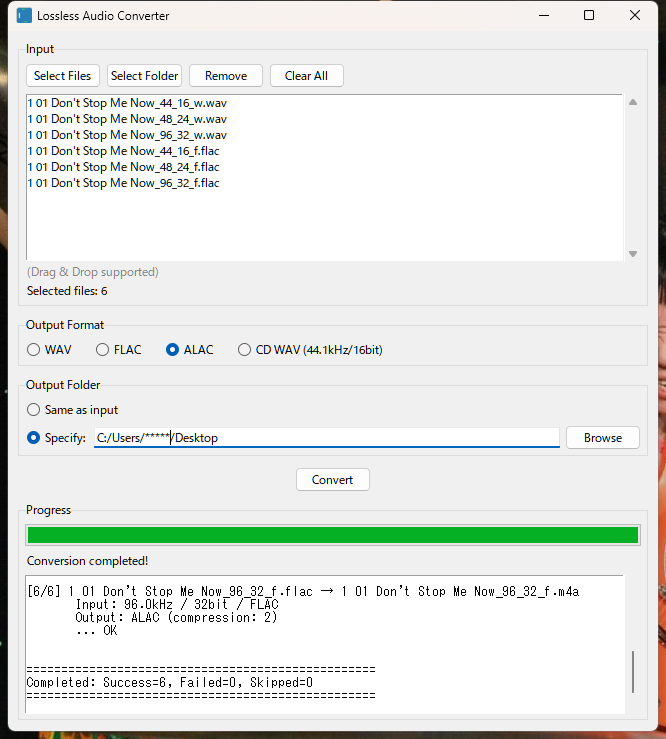
A GUI tool for converting between WAV, FLAC, and ALAC formats, as well as converting to CD format (44.1kHz/16bit) WAV. Metadata (tags and cover art) are fully preserved during conversion.
Overview
Supported Conversions
WAV → FLAC / ALAC / CD WAV
FLAC → WAV / ALAC / CD WAV
ALAC → WAV / FLAC / CD WAV
Features
Lossless conversion preserves original audio quality
Preserves original sample rate and bit depth (except for CD WAV conversion)
Fully preserves metadata (artist, album, title, track number, cover art, etc.)
Drag and drop file selection supported
Batch conversion of multiple files
Detailed conversion log display
Note
ALAC 24bit is converted to WAV 32bit float.
(This is to ensure compatibility, as some tools may not correctly handle 24bit WAV files)
System Requirements
OS
Windows 10 or later
Other
FFmpeg installation required. You can easily install it using FFmpeg Manager .Alternatively, place ffmpeg.exe and ffprobe.exe in the same folder as lossless_audio_converter.exe for automatic detection.
Distribution Files
lossless_audio_converter.exe
Executable file
Download
lossless_audio_converter.zip (24.6MB)
Supported Formats
WAV
Uncompressed audio file (16bit / 24bit / 32bit supported)
FLAC
Lossless compressed audio file (Free Lossless Audio Codec)
M4A (ALAC)
Lossless compressed audio file (Apple Lossless Audio Codec)
CD WAV
CD standard compliant WAV file (44.1kHz / 16bit)
How to Use
Selecting Audio Files
Use the Add Files button to select files.
Use the Add Folder button to select a folder (supported files in the folder will be added).
You can also drag and drop multiple files or folders onto the list.
Use the Clear button to clear the list.
Selecting Output Format
Choose from the following 4 output formats:
WAV
Uncompressed format. Highly versatile.
FLAC
Lossless compressed format. Reduces file size without quality loss. Output at compression level 8 (maximum compression).
ALAC
Apple Lossless format. Ideal for playback on iPhone / iTunes. Output at compression level 2.
CD WAV
CD standard (44.1kHz / 16bit) WAV file. For CD production purposes.
Conversion to the same format is skipped (e.g., WAV → WAV). WAV files already in CD format are skipped during CD WAV conversion.
Selecting Output Destination
Same as input
Output to the same folder as the input file.
Specify folder
Output to a folder specified using the Browse button.
Running Conversion
Press the Convert button to start the conversion process. Progress and detailed logs are displayed at the bottom of the screen.
Output File Names
FLAC / WAV / ALAC
Original file name with changed extension (e.g., track01.wav → track01.flac)
CD WAV
Original file name with "_cd" appended (e.g., track01.flac → track01_cd.wav)
If a file with the same name exists, a sequential number is automatically appended (e.g., track01_2.flac).
CD WAV Conversion Details
Create high-quality CD audio sources from high-resolution audio.
Resampling
High-quality conversion using soxr VHQ (Very High Quality)
Dithering
TPDF (Triangular Probability Density Function) dither for 16bit quantization
Processing Target
Only files that are not 44.1kHz / 16bit are automatically detected and converted
Metadata Preservation
The following metadata are preserved in the appropriate format for the destination:
Title / Artist / Album
Album Artist / Composer
Track Number / Disc Number
Year / Genre
Cover Art
Disclaimer
Use of this tool is at your own risk.
The developer assumes no responsibility for any changes or loss in audio quality resulting from file conversion.
It is strongly recommended to back up important files beforehand.
For commercial use, please comply with relevant copyright laws and license agreements.
The developer assumes no responsibility for any damages caused by the operation of this tool.
This tool may cease to function in the future due to changes in Windows specifications or FFmpeg updates.
Support is generally not provided.
Update History
January 2026 v1.0
Initial release
Developer Information
Developer: Noriya
E-mail noriyahd28v@gmail.com