Overview
Media Audio Analyzer is a GUI tool for measuring the loudness of video and audio files. It performs measurements compliant with EBU R128 and ITU-R BS.1770 standards.
System Requirements
- Windows 10/11
- ffmpeg (set in PATH or placed in the same folder as the EXE)
Note: ffmpeg must be installed separately. Download it from the ffmpeg official website.
Download
- media_audio_analyzer.zip (9.87MB)
Measurement Parameters
| Parameter | Description |
|---|---|
| LUFS | Integrated Loudness. Represents the average loudness level of the entire file. |
| TP | True Peak. The maximum peak level after digital-to-analog conversion, expressed in dBTP. |
| LRA | Loudness Range. The variation in loudness, expressed in LU. |
Compliance Standards
- EBU R128 - European Broadcasting Union loudness recommendation
- ITU-R BS.1770 - International Telecommunication Union loudness measurement algorithm standard
Supported Formats
Video Files
mp4, mkv, avi, mov, wmv, flv, webm, m4v, ts, mts, m2ts, vob, mpg, mpeg
Audio Files
mp3, wav, flac, aac, ogg, m4a, wma, aiff, aif, opus, ac3, dts, ape, wv
Features
- Drag and drop support for files and folders
- Batch processing of multiple files (multi-threaded)
- Automatic sorting by filename
- Append results with additional drops
- Cancel processing function
- Export results to CSV
- Alternating row background colors for better visibility
- Color-coded measurement values
How to Use
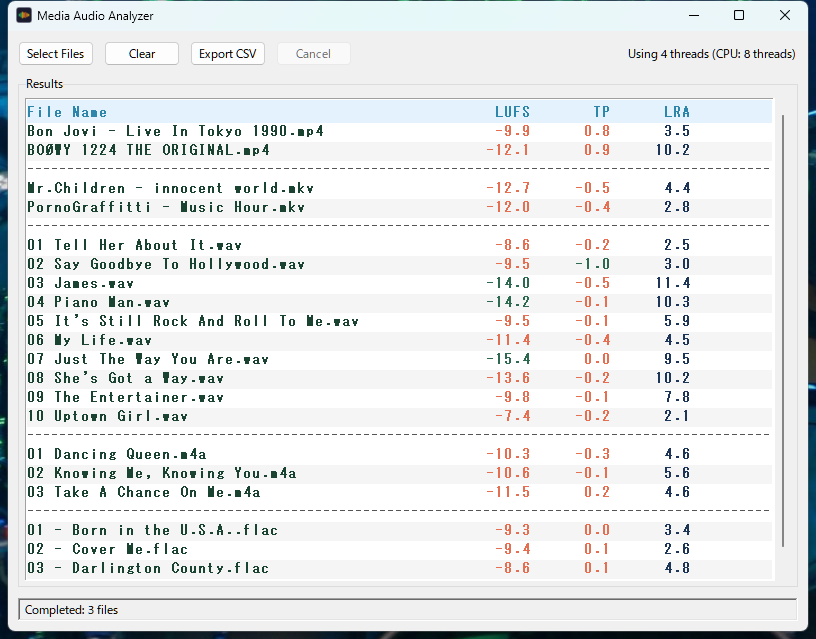
- Launch media_audio_analyzer.exe
- Drag and drop files or folders onto the window (or click the "Select Files" button)
- Measurement starts automatically and results are displayed
- Click the "Export CSV" button to save results if needed
- Click the "Clear" button to clear results
Color Coding Standards
| Parameter | Green (Good) | Orange (Caution) |
|---|---|---|
| LUFS | -24 to -14 LUFS | Outside the above range |
| TP | -1.0 dBTP or below | Above -1.0 dBTP (risk of clipping) |
| LRA | No judgment (displayed in blue) | |
CSV Export
You can save measurement results to a CSV file. The exported CSV contains the following columns:
- File Name - Name of the file
- File Path - Full path of the file
- LUFS - Integrated loudness value
- TP - True peak value
- LRA - Loudness range value
- Error - Error message (if applicable)
The filename is automatically generated in the format "audio_analysis_datetime.csv".
Loudness Normalization by Streaming Platform
Streaming platforms perform "loudness normalization" to eliminate volume differences between tracks and provide a comfortable listening experience. This mechanism automatically adjusts the volume of uploaded audio to match the platform's target level.
How normalization works:
- Tracks louder than the target → Volume is reduced during playback
- Tracks quieter than the target → Volume is increased during playback (varies by platform)
| Platform | Target Level | Normalization Behavior |
|---|---|---|
| Spotify | -14 LUFS | Turns down loud tracks, turns up quiet tracks. User-selectable: -19/-14/-11 |
| Apple Music | -16 LUFS | Turns down loud tracks, does not turn up quiet tracks (Sound Check) |
| YouTube | -14 LUFS | Turns down loud tracks, does not turn up quiet tracks |
| Amazon Music | -14 LUFS | Turns down loud tracks, turns up quiet tracks |
| TIDAL | -14 LUFS | Turns down loud tracks, does not turn up quiet tracks |
| Deezer | -15 LUFS | Turns down loud tracks, turns up quiet tracks |
| Pandora *US only | -14 LUFS | Turns down loud tracks, turns up quiet tracks |
| SoundCloud | None | No normalization (plays at uploaded volume) |
Mastering Tips:
- Mastering around -14 LUFS minimizes adjustments across most platforms
- Commercial music is often produced at -8 to -10 LUFS, accepting that it will be turned down
- Excessive loudness can result in a loss of dynamics when normalized down
True Peak Recommendation: All platforms recommend -1.0 dBTP or below. This prevents clipping during encoding for streaming (conversion to AAC/Ogg, etc.).
Notes
- Files shorter than approximately 400 milliseconds cannot be measured ("Too short" will be displayed)
- You cannot drop additional files while processing is in progress
- When dropping a folder, files in subfolders are not included
Version Information
- Version: 1.0.0
- Release Date: February 2026