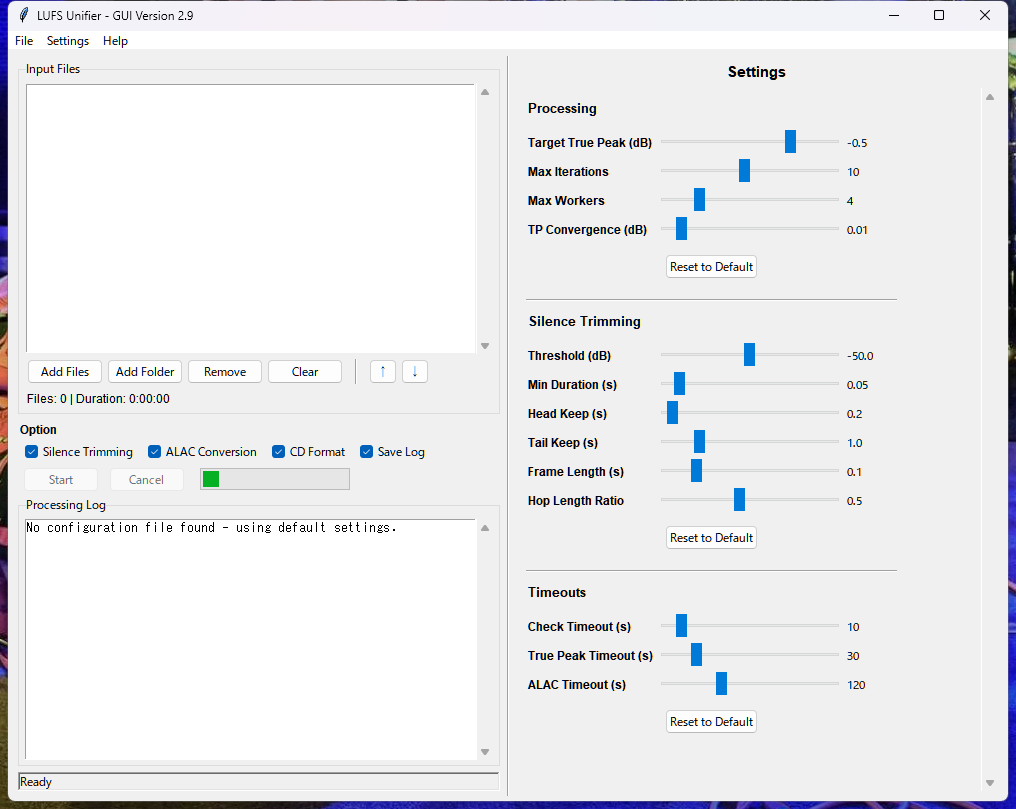
A tool for unifying LUFS using linear gain adjustment only. This is the GUI version of LUFS Unifier. By selecting optional features, it can also function as
the GUI version of LUFS Unifier Simple.
Development Background
When creating compilation albums or best-of collections from digital audio files gathered from various sources,
volume differences between tracks inevitably become a problem. Inconsistent volume levels make listening
frustrating and uncomfortable. This tool was developed to solve that problem.
The key feature of this tool is its design to preserve the "musical dynamics" that are often lost in typical
normalization processes, maintaining them to the greatest extent possible.
Overview
Main Features
Unifies LUFS using linear gain adjustment only, normalizing the perceived volume of input
WAV, FLAC, and ALAC files, and saves them as WAV files.
FLAC/ALAC files are automatically converted to WAV. Original sample rate and bit depth are preserved.
All metadata from original files are preserved, including album artist, artist, album, disc number, track
number, title, composer, year, genre, and cover art.
Optional Features
Remove silence from the beginning and end of each file.
Convert and save as ALAC files (Apple Lossless: lossless compression format) for use on smartphones and
other devices.
High-quality conversion to CD format (44.1kHz/16-bit) WAV files.
Save processing logs from this tool.
System Requirements
OS
Windows 10 or later
Other
FFmpeg installation required. Easy installation using FFmpeg Manager.
Alternatively, place ffmpeg.exe in the same folder as lufs_unifier_gui.exe for automatic detection.
Tag information (artist name, album name, track title, jacket image, etc.) from original WAV files is
completely preserved in processed WAV files and ALAC files.
Before using this tool, it is recommended to properly enter tag information (ID3v2.3) for original WAV files
using MP3TAG or similar tools.
If all WAV files have the same "Album Name" tag information, the folder will be named after the album name
instead of "alac".
Audio Terminology
RMS (Root Mean Square)
An indicator representing the average strength of sound, also known as effective value.
What it Measures
The "actual power" of sound
Characteristics
Relatively close to the volume perceived by the human ear
Unit
dB (decibels), e.g., -12 dB RMS
Applications
Volume balance adjustment during mixing
LUFS (Loudness Units relative to Full Scale)
A loudness unit and currently the most important volume measurement standard.
What it Measures
"Perceived loudness" actually felt by humans
Characteristics
Considers frequency characteristics, most closely matching human auditory perception
Unit
LUFS
Streaming Standards:
Spotify: -14 LUFS
YouTube: -14 LUFS
Apple Music: -16 LUFS
Applications
Mastering for streaming distribution
Measurement Method in This Tool
Using FFmpeg's ebur128 filter (ITU-R BS.1770-4 compliant)
TP (True Peak)
The true peak value representing the maximum possible volume that can occur during digital-to-analog conversion.
What it Measures
The actual maximum volume that can occur after DA conversion (digital-to-analog conversion)
Characteristics
Detects hidden peaks that cannot be detected by standard peak meters
Unit
dBTP (decibels True Peak)
Recommended Value
-1 dBTP or lower (to prevent clipping)
Applications
Final check during mastering
Measurement Method in This Tool
Using FFmpeg's ebur128 filter (ITU-R BS.1770-4 compliant), measuring simultaneously with LUFS for
accelerated processing (approximately 1.5-2x faster)
LRA (Loudness Range)
Loudness Range represents the width of volume variation throughout a track.
What it Measures
The difference between quiet and loud parts in a song
Characteristics
Quantifies the dynamics (expressiveness) of music
Unit
LU (Loudness Units)
Guidelines
3-6 LU: Heavy compression (EDM, Pop)
10-15 LU: Moderate dynamics (Rock)
15+ LU: Rich dynamics (Classical, Jazz)
Detailed Operation of This Tool
While the basic goal is to unify LUFS, typical "normalization processing" to achieve a specific LUFS value is not
performed. This is because normalization can significantly alter the dynamics (LRA) of music in some cases.
Therefore, this tool unifies LUFS using only linear gain adjustment. The processing flow is as follows:
Measure LUFS and TP for each file (ITU-R BS.1770-4 compliant)
By default, limit TP to -0.5 dB, calculate the difference between each file's TP and -0.5, and compute MAX
LUFS for how much LUFS can be raised (or lowered) for each file
Consider the minimum value of MAX LUFS for all files as the Target LUFS for all files
Adjust gain for each file by the difference between its LUFS and Target LUFS
Re-analyze step 4, and if maximum TP is not at -0.5, adjust Target LUFS and perform gain adjustment again
By default, allow TP error of 0.01 dB to converge gain adjustment (maximum 10 iterative gain adjustments)
After processing completion, automatically delete intermediate files (trimmed folder)
This logic theoretically achieves zero LRA variation by unifying LUFS through linear gain adjustment only.
Audio Quality Improvement Features
The following audio quality improvement features are automatically applied during linear gain adjustment
processing.
DC Component Removal
Automatically removes DC component (DC offset) for accurate peak measurement
Float64 High-Precision Calculation
Internal processing executed in 64-bit floating point to minimize cumulative calculation errors
Triangular Dithering
Reduces quantization noise for 16-bit output (automatically skipped for 24-bit or higher. Limiting is
intentionally not implemented)
Memory Optimization
Memory optimization features are implemented for stable processing of large files
Dynamic Worker Adjustment
Automatically adjusts parallel processing thread count based on file size
File Size Determination
Small size (average <50MB): Full parallel processing as specified
Medium size (average 50-100MB): Parallel count reduced to 75%
Large size (average ≥100MB, maximum <200MB): Parallel count reduced to 50%
Very large size (maximum ≥200MB): Single-thread processing
On-Demand Processing
Audio data is not kept in memory but read from original files when needed
Settings
Processing
Target True Peak (dB) (Default: -0.5)
Target True Peak value. The True Peak of final WAV files will always be at or below this setting. Typically
set to around -0.5dB to prevent clipping.
Max Iterations (Default: 10)
Maximum iteration count for LUFS adjustment. Usually once is sufficient, but default is set to 10 for safety
margin. Generally no need to modify.
Max Workers (Default: 1/2 of CPU cores, minimum 4)
Maximum number of parallel worker threads. Adjusting according to PC's CPU core count can speed up
processing. This becomes the maximum value for automatic adjustment based on file size.
TP Convergence (dB) (Default: 0.01)
True Peak (TP) convergence tolerance margin. Adjustment is considered complete when the difference between
Target True Peak and adjusted WAV file's TP is within this setting.
Silence Trimming
Threshold (dB) (Default: -50.0)
Volume level below which audio is considered silence. -50dB is typical.
Min Duration (s) (Default: 0.05)
Minimum duration to be considered silence. Shorter silence periods are ignored.
Head Keep (s) (Default: 0.2)
Duration from the beginning that will not be removed. Protects fade-ins and similar effects.
Tail Keep (s) (Default: 1.0)
Duration from the end that will not be removed. Protects reverb and fade-outs.
Frame Length (s) (Default: 0.1)
Analysis frame length for silence detection. 0.1 seconds is typically sufficient.
FFmpeg Timeouts
Check Timeout (s) (Default: 10)
Timeout for FFmpeg existence verification. 10 seconds is usually sufficient.
True Peak Timeout (s) (Default: 30)
Timeout for True Peak measurement processing. Increase if failing with large files.
ALAC Timeout (s) (Default: 120)
Timeout for ALAC format conversion processing. Increase if failing with large files.
Disclaimer
Use of this tool is at your own risk.
The developer assumes no responsibility for any changes or loss of audio quality resulting from audio file
processing.
Backing up important files beforehand is strongly recommended.
For commercial use, comply with relevant copyright laws and licensing agreements.
The developer assumes no responsibility for any damages arising from the operation of this tool.
Due to Windows specification changes or FFmpeg updates, the tool may cease to function in the future.
Support is generally not provided.
Version History
January 2026 v3.0
Removed unused libraries to significantly reduce EXE file size (134MB→25MB) and improve startup
time. Added
tooltip (full path display) to file list. Changed CD conversion resampling to soxr HQ.
January 2026 v2.9
Released as GUI Version. Internalized yaml files, made settings adjustable in GUI. Made it possible to save
and load original settings as yaml files.
This tool was developed to provide music enthusiasts with a better listening experience. If you have any
questions or feedback, please feel free to contact us at the above address.